In the course of my (not that long) career, I heard multiple times the same
remarks and questions when I told my colleagues and friends about my Debian activities:
Why Debian?
Why do you think packaged distros are still useful?
Aren’t Debian packaging methods overly complex?
Why isn’t there any understandable tutorial about packaging?
Well. I admit I always wanted to answer these questions on a written medium,
so that it both helps me to provide answers to these questions but also it can
benefit others.
In this series I’ll specifically focus on the questions 2 to 4. Question 1 is
also quite interesting, but I’d rather provide an answer to it separately.
So here let’s focus on the packaging aspect and more specifically, Debian Packaging.
I’ll start with providing my opinion on the three questions upwards, and then
I’ll provide a first insight on Debian packaging, including the various
resources already available on the web.
Some context first - the Linux Distribution chaos
As it’s probably obvious to people having gravitated around
GNU/Linux environments for some time, there are a lot of
distributions. Choosing one is essentially a subjective and personal
topic, as there are no universal answers to what system is the best
for whom.
Some well-known GNU/Linux distributions include:
Arch Linux - a distribution oriented
about being lightweight and keeping things simple. It’s a rolling
release-based distribution, therefore it has no stable release. The
packaging mechanism is quite simple as the packages are simply
scripts describing a build mechanism.
It features the Arch Build System, which behaves a bit like BSD
ports and allows one to chose between installing an already built
package or compiling the software from sources;
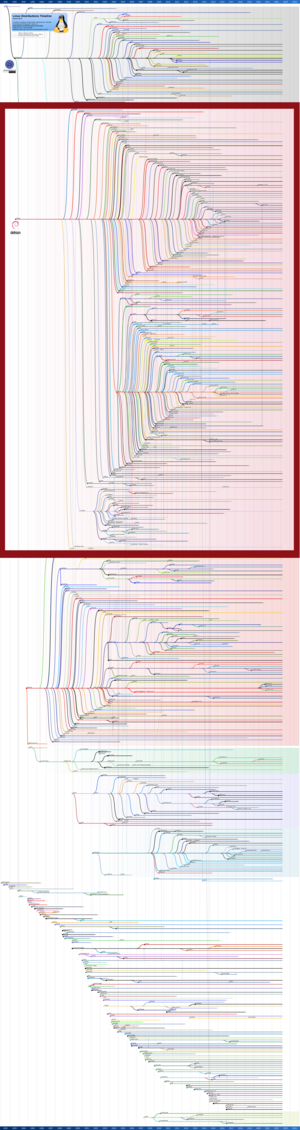
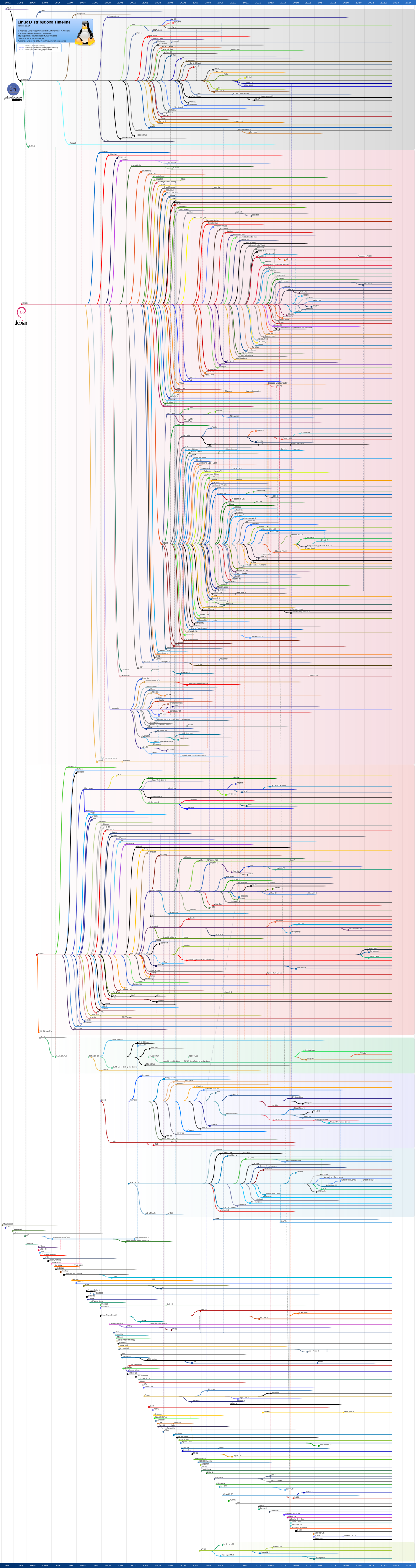
Debian - the currently second oldest distro
still in active development (old as 1993 old), behind Slackware. It
aims at being a « universal operating system », as in not
specifically targeting any part of the community, or hardware. To
fulfill this goal, it allows easy shipping of non-free software and
firmware. What makes Debian stand out is its governance
model. It’s the
top distro of a huge tree of distro, ranging from Ubuntu or Mint to
Pardus and Astra, going through Kali or Proxmox;
See the red square? That’s all Debian-based distros!
Debian is designed to be available on multiple
architectures and has one of the widest architecture support.
Gentoo - a modular, portable and
optimized distribution. Its packaging system is quite unique. It
relies on
Portage for
packaging. Essentially, installing or upgrading packages consist of
downloading their source code and building them directly on the
user’s machine, following metadata provided by
ebuild files;
NixOS - one of the outsider distributions a
bit like Gentoo. It’s build on the principle of reproducibility and
portability. It features a specific language called Nix. It serves, as for an example to declare the system
configuration as a whole, ie the expected functionalities. The
design offers an atomic upgrade system (installing new packages is
an upgrade, as it’s a change in the system configuration), that
allows trivial and lightweight rollbacks in case an upgrade leads
to an unusable environment.
Ubuntu - probably one, if
not the best-known GNU/Linux Distribution. It’s a fork of Debian,
so it’s an
apt-based
distro. Ubuntu has been made by Mark Shuttleworth at a time when he
was (relatively) active as a Debian Developer, as an attempt to fix
a simple problem: Microsoft has a majority market
share.
It differs from Debian on user-friendliness, which is far more
developed, recent hardware integration, and the
snap packaging
manager that comes along in parallel of APT. Its main difference
is that it makes it easy for upstream to have their software available
to end users and also that it deploys applications in a
self-contained, isolated environments with mediated access to the
host, relying heavily on
AppArmor and
namespaces. Snaps
are essentially consisting of a single compressed filesystem (in a
SquashFS);
Red Hat Enterprise
Linux -
the most known commercial distribution. targeting enterprise
servers. It relies on
RPM packaging
system. It’s based on Fedora
Linux with a year
delay between both distributions advancement. On top of it,
multiple additional packages and services are provided.
I personally use Debian because I entered in GNU/Linux distributions thanks to
a Debian Derivative, namely Ubuntu.
Not so short story of my IT skills journey.
Warning
This part is not really useful unless you’re feeling curious. Don’t
hesitate to skip it.
I started playing with computers when I was around three to four years old. My
dad had a Fun School 4 floppy. I
could not read or understand English, but in a trial and error way, with my
older brother, we managed to understand what would work or not (I also
discovered, at my dad’s expense, that putting
Kiri in the floppy slot was really not the
best idea I had).
We soon discovered the pleasure of killing nazis in Wolfenstein
3D, and for this I gather two
things: first, my parents were very lax when it comes to age limits, as a lot
of people would say that a 5 y/o killing nazis in one of the best FPS at that
time is maybe a bit too much, and second, id Software is, to me, the company
that transformed the video game industry the most at that time. Even Valve
hardly did as much when it comes to technical jumps.
Let’s go fast forward, as knowing that I enjoyed AoE, StarCraft, FFVII, FFVIII,
FF… well, video games, is not the purpose of this article.
Soon I was known as the IT problem solver in my family. My father was running
an IT Services company, and I was very curious, so I asked a lot of questions
and tried a lot of stuff. I did plenty of screwups too, but he never really blamed
me as much as he could have, helped me fix stuff, showed me how to open a
computer and replace parts.
I think that he’s the one to whom I owe my current career as my passion for
digital stuff was nurtured by him and he always have been supportive,
even when he feared that my involvement in IT was a danger for my studies (this
doesn’t mean we never had lengthy discussions or arguments, or that he didn’t
sometimes forced me to refocus, but having someone telling you that you’re
potentially screwing up and helping you resuming on track doesn’t mean they’re
not supportive).
When I was 15, we didn’t have a reliable Internet access at home, so I was
going almost everyday at my grandmother’s house to geek on her PC. At that
time, I was spending plenty time learning programming languages (learning
(x)HTML, PHP, JS, C, C++ and a bit of Perl). I’d like to extend a lot of thanks
to Mathieu Nebra and his personal project at that time: the “Site du Zéro”,
which became OpenClassrooms, as it’s the main
platform where I discovered the programming languages I use. At 16, we
eventually got our own access so I stopped bothering my grandma for Internet
access (which did not mean I was no longer going to see her, but instead of
being a geeky youngster just saying hello and going on her PC, I was going to
see her and my grand father to chat with them and drink a hot chocolate, which
was in every way better for both of us. Grandparents are really tolerant, if
you still have some alive whom you like to spend time with, please make the
effort. Same goes for your parents, provided you like to spend time with them).
After a short period where I was spending more time interacting with friends on
MSN Messenger (oh those
were good times) and IRC (I discovered freenode in 2006!), I resumed the
activity of learning as much as I could on a computer. For my 17th birthday, I
got my first own PC (to be compared with having a family PC before). Still on
the “Site du Zéro”, there was at the time a very good course written by Mathieu
Nebra, that seemingly was refactored into something sadly far less
comprehensive today. The OS recommended in the course was Kubuntu.
To be fair, I really admired that Canonical was sending free CDs around
the world to be able to install Ubuntu/Kubuntu/Xubuntu, but I did not enjoy KDE
that much. In 2007, I found it too much Windows-like and bloated. That being
said, learning shell and many core things (and, also, having to play with ndiswrapper
to rebuild my Wifi Dongle driver for Linux) was really exhilarating. That being
said, in 2007-2008, I was in my first year of “Classes Préparatoires” in order
to pass entrance exams to enter engineering schools, so I gradually started to spend
more time studying maths and physics and less into IT, telling myself I’d
resume later. It was spot on, although I was sad to have to stop.
In 2010, I finally entered ENS Cachan (which since then became ENS Paris
Saclay) Math studies, and decided to resume IT
Stuff. I installed Ubuntu (the bare one, with Unity) on the PC I bought myself
in Oct 2010, and joined the Cr@ns, a non-profit ISP
that was providing 100 Mbps symmetric Internet Access for 50 € a year on the
campus. The first year I was mostly doing Maths and in Feb 2011, I joined the
student association (at ENS Cachan, if you want to join, you join for one year
after the first half of the first year).
In June I bought myself one of the famous Asus eeePCs to be able to take notes
in class and have a laptop for meetings. On it, I installed Debian
because Ubuntu was too heavy. I spent around 8 months becoming better at system
engineering, and then in 2012 I decided to dedicate myself fully in Cr@ns when I
left the student association. There I made a huge jump in system and network
engineering, learning all the basic and complex stuff an ISP or an IT
department would do, and as the whole stack was under Debian, I left Ubuntu for
good (I still generally like the distro and would recommend people to use it if
they are beginners, although these days I’d recommend Mate for beginners).
My journey within Debian lasted since then. I started to be interested in
Debian Packaging in 2013, and decided to try contributing in 2015 with
Mailman3
Packaging.
Mailman3 was a series of 6 software packages to package independently. I made an
attempt and looked for a sponsor. It took me two years to eventually get the
interest of a Developer. As I was in my Ph. D. studies, I had a lot of other
stuff going on. From there I became a Debian
Maintainer in late 2017. And then I
became a Debian Developer just
after having joined ANSSI in 2018.
Since then, I would still have things to tell, but, hey, it’s already too long,
and I prefer to keep the remaining bits to myself for now.
So, why Debian?
Enough with myself, but it might help to answer to the “Why Debian?” question.
Mostly, there’s no good answer, as a lot of things for distros is subjective.
That being said, there are multiple good reasons to consider Debian as an option:
It’s fully community run. Debian is not powered by a company, and the
orientation of the project is the one its community of developers,
maintainers and contributors want to give to it1;
It probably is the distribution supporting the widest range of architectures;
Debian is stable. The packages are extensively tested and there is only one
major release of the distribution per 2 to 3 years. The stable updates are
chosen carefully and therefore no major disruption is to be expected on
partial releases;
Debian offers a wide range of user applications, from HPC to BioInformatics
to system administration to pentesting;
The project is transparent on problems and choices it makes.
There are probably more good reasons, but these are the ones coming to mind
when trying to answer this question.
Sure, there are also some cons to use Debian as a distro.
Debian stable is released multiple months after the freeze, meaning some
fast-paced-released softwares will already be around 6 months old when
released in stable. As the release policy for updates in stable is
generally not allowing any major update on the packages (except for
StableUpdates, with some criteria
to meet), this means that after one or two years, most software might seem
outdated to those expecting recent software. Of course, one can either use
the Backports sub-repository, use
Testing, which is the current
version with the most recent software having fulfilled the migration
criteria, or use Sid, which is our
“nightly”. Of course both these versions are far less stable;
Debian being community-based, things go as well as the people have time to
improve them. A lot of things within Debian are therefore slow-paced;
Some of Debian core utilities, the Debian
Installer,
DPKG,
APT,
DebConf might be perceived as archaic.
These are very powerful and efficient tools, but still, user-friendliness matters;
Debian is fully community-based for decision making, we are famous also for
our flamewars.
Same thing: there are other cons I probably forgot. But as I wrote
earlier, this is why it’s subjective, I think one must chose depending
on what matters to them.
Packaged systems - pros and cons
Let’s be fair, there’s a regular question I hear since 2013, and we
probably need to tackle it at some point: why are distros still
relevant when one has containerized systems?
First of all, of course, you need something on your laptop or server
to be able to deploy containers. That is: containers are not
full-fledged systems. Let’s make a short pit-stop here to discuss a
bit about the two main container architectures we see today.
Operating System level virtualization
An OS container is a container which runs an almost full OS. It’s not
actually a full OS because the kernel is shared between the
containers. But the rest is separate. The most well-known active
project providing this feature is the Linux
Containers project.
LXC uses widely the kernel namespaces
and cgroups features to provide a fully isolated execution environment
in which, let’s say, a Debian distribution is deployed. In this
distribution one can deploy any needed software or application and
provide services. It can be a nice way to split a physical machine in
multiple isolated environments.
Compared to full virtualization methods, it brings potentially a little less
security, first because the host sees all containers’ processes, and also
because namespacing, while very mature, is still evolving and a bit less mature
than full-fledged virtualization methods. On the opposite side, it’s far easier
to debug when troubles arise, and the performance overhead is close to zero.
This is generally the preferred way to run stable environments with little to
no redeployments needs, long-term applications not needing frequent changes, or
environments with needs to access directly the hosts’ hardware (GPU, NICs,
etc). It’s also an environment that make debugging quite easier as one can
deploy any debugging suite in the container when a problem arises.
Application level containerization
An application container is a container containing only the
application one wishes to run and its direct dependencies. It provides
in general the same level of isolation as an OS-level
virtualization. The historically prominent app-level containerization
software was the Docker project. Since then,
other platforms appeared, eg Podman or
Kubernetes, the latter being more of a
cloud-scale orchestrator.
The application-level containerization is a perfect framework for
development environments, CI/CD platforms, scalable environments -
including platforms with a lot of microservices, or throwable
containers (ie either you redeploy very fast or the only artifact you
care about is the storage).
It can be quite irksome to debug when things are going south in
complex environments, in particular if debugging has not been planned early-on.
The other big criticism one can make towards these environments is
that they’re very friendly, with a lot of things done under the
hood. While it’s therefore quite easier to enter in at the beginning,
this means the end user might not have a strong understanding of Linux
systems and configurations, while this can become needed in some crash situations.
I recommend any curious user to try both platforms and
containerization types. Note that getting into
Docker, Podman or
LXC is quite easy in general even
though they all come with some complex concepts if one want to
understand how they work. Kubernetes is,
however, a different beast, that requires some understanding of the
other platforms before.
Note that LXC comes with its own
orchestrating platform, or manager, named
Incus. Its purpose is to operate
both system and application containers, but also virtual
machines. Application containers support is quite new, so it probably
needs some patience and a round of tests, but on the long-term, it
might be the first platform to offer support for the three main
virtualization alternatives.
When are distros more suitable than containers?
The short answer is: it depends on what you’re doing and/or how you intend to
do it. Let’s try to have some nuance, and to explore multiple options and
paths. I won’t be exhaustive because this article is already longer than
what it should be (who said I’m verbose??).
Workstations and laptops: to be able to boot them, one needs a base OS
even when they plan to run containers. Whether you’re a container enthusiast
or not, your laptop runs a distribution (if you run Talos Linux to have a
k8s running your daily stuff on your laptop, you’re not a container
enthusiast, you are a human-container yourself). And on a
workstation, you generally want a cohesive environment where applications
integrate well with each other, share libraries, and follow consistent
conventions. Running your text editor, browser, and music player each in
their own container would be absurd (except if you are a human-container).
Depending on your workflow, you might prefer to have something tailored to
your needs as Gentoo or NixOS will give or something that is more generic
but closed to what you expect on server environments, and then a more
classic distro is a nice touch. If, like me, you’re a distro developer, then
generally you’ll prefer to work on the distro you contribute to.
Servers with long-lived services: when you’re running services that need
deep system integration, hardware access, or long-term stability without
frequent redeployments, a well-maintained distribution makes sense. Think of
a mail server, a DNS resolver, or a database that you don’t plan to redeploy
every week. That being said, here it’s also a matter of scaling and
preference. Having 35 VMs acting as a postfix cluster is a way to do it, but
having 150 containers all running a postfix instance behind a loadbalancer
works perfectly, too. Generally, the more vital the service is to your core
infra, the better it is to have it on a bare-system to avoid complex
dependency/chicken-and-egg issues if your whole infra crashes.
Debugging and understanding: when something goes wrong in a container,
you’re often left with minimal tools and no context. On a full system, you
can install strace, gdb, or whatever you need. More importantly, you
understand how things are put together because you had to learn it. This
is key especially when one is new with infrastructure as it gives a proper
sense of how things are designed that will be key to their debugging skills
whatever the stack they’ll handle later on. That being said, container
environments also come with great observability tools that in general will
help one to navigate when things are not going properly, and a lot of people
have a debug environment image including all the aforementioned tooling.
Security-sensitive environments: in some contexts, you want to know
exactly what runs on your system, where it comes from, and who reviewed it.
Distribution packages come with a chain of trust, maintainer accountability,
and security teams tracking CVEs. A random Docker image from Docker Hub…
not so much.
At this step, the “it depends” part of my initial answer is probably buzzing in your head.
There’s one bit that matters a lot: the ecosystem you’re in.
Say you are in a new company (they call it a startup nowadays, it’s a fancy
name to say that you generally live on the money of others), and there’s one
CEO, one CTO, and you. Setting up a kubernetes infra to run the MVP the CTO is
currently coding (with Claude Code or Codex, let’s be modern \o/) will probably
drain most of your work time while having it run on whatever cloud-rider’s
platform or in an LXC/podman/docker container on a bare-metal machine you’ve
just installed will be far less painful.
On the contrary, if you arrive in a company with 12 people maintaining the
infra and they all work on a kube cluster, well, this sets things, and having a
distro installed on a bare-metal machine for the new service is a nice way to
say you’re resigning.
So, are distros still relevant?
Yes. Containers didn’t kill distributions; they changed where and how we use
them. In practice, most container images are built on top of distributions
anyway. When you write FROM debian:bookworm in your Dockerfile, you’re
relying on Debian’s packaging work.
The real question isn’t “distros vs containers” but rather “where does
packaging fit in the modern stack?” And the answer is that it fits everywhere.
Whether you’re building a container image, deploying on bare metal, or
maintaining a fleet of VMs, someone needs to turn upstream source code into
something installable. That’s packaging. Someone doing a container is actually
doing some packaging.
That being said, playing on semantics is not really answering, so let’s focus
on the first part of my answer. While one wants to be able to ship their own
product in an smooth way, with cloud platform advantages,
they usually don’t want to care about the boring stuff, and generally this
means that the whole underlying infrastructure is either delegated or done with
distros and boring packages.
Aren’t Debian packaging methods overly complex?
This is probably the question I hear the most from colleagues discovering
that I contribute to Debian. And I’ll be honest: the answer is “yes and no”.
Debian has bootstrapped when I was putting some Kiri in a floppy disk slot. At
this time, Linux was a hundred developers project, without namespacing, without
cgroups, without 90% of the things we know today. We are in 2026 (fun fact, I
started this article in 2024, I promise I won’t take two more years to write
the next one) and many have no clue about the world we come from.
Considering this, yes, packaging methods in Debian are complex, because they
come with a 33 years legacy, and our systems must be able to build some
packages of which the building rules have not changed in the past 10 years.
Docker, in comparison, is only 13 years old.
Carrying the legacy of 33 years of production environment is not the same as
dragging 13 years of it while still being seated on the knowledge and expertise
everyone built in the same time.
So, yes, Debian packaging can be complex. The policy manual is extensive, the
tools have accumulated decades of history, and there are multiple ways to
achieve the same result. If you dive into a package like systemd or gcc,
you’ll find a level of complexity that might seem overwhelming.
But here’s the thing: most packages aren’t complex. A well-behaved Python
library or a simple C program with a standard build system can be packaged
in an afternoon when one begins and in an hour for an expert. The complexity
exists because Debian handles edge cases, supports multiple architectures, and
has been doing this for 30 years. You don’t need to understand all of it to get
started, and the fact that some fancy features (think immutable, think
containerized packages à la snap) are not there yet don’t mean they won’t be a
day, and don’t mean that you can’t get your way with Debian packaging.
The packaging system is like a toolbox. Debian’s ecosystem is just a very big,
very old toolbox with a lot of stuff one might think is useless and on the way
of progress but that actually come in handy from time to time. One doesn’t need
to master every tool before one can hammer a nail. Start simple, learn
incrementally, and don’t let the size of the policy manual or the developer’s
reference intimidate you.
Why isn’t there any understandable tutorial?
Now this is a fair criticism. The existing documentation tends to fall into
two categories:
Blog posts and quick guides - accessible but often outdated or
incomplete. Packaging practices evolve, tools change, and a guide from
2015 might lead you astray in 2026.
What’s missing is something in between: a progressive, practical guide that
explains not just what to do but why, and that acknowledges the modern
tooling without drowning in historical baggage.
That’s what I’ll be attempting with this series. I won’t promise it’ll be
perfect, but I’ll try to make it the guide I wished I had when I started.
Available resources - and a teaser for the next articles
Before diving into the actual packaging work, let me point you to the
existing resources. Even if they’re not perfect tutorials, they’re essential references:
In the next articles, I’ll walk through the actual packaging process, starting
with a simple example and progressively introducing more advanced concepts.
But first, I’ll talk about the lifecycle of a package in Debian. It might sound
a bit off-track, but it might help anyone trying to start contributing.
I still have plans to abuse my Debian System Administrators powers to add
an April Fool’s webpage telling that Dell acquired Debian and now we will
call ourselves Dellbian, but I’ll wait until I have no credit to reimburse
and no kids to fund as it’s plausible that the lawsuit that would ensue would
put me on the street. :D